Think, Draw, Art!

for art lovers

  • Home
  • Gallery
  • Contact
  • Recent Articles
  • Article Categories
    • Daz Studio
    • 3D Art
    • 2D Art
    • Contest

Making Skin Pop with the Daz Studio Iray Uber Shader – Part 2

October 15, 2021 by Guest Writer 6 Comments

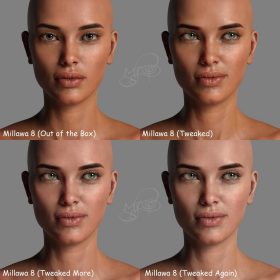
Side by side face comparisons of out-of-the-box Millawa 8 face and skin and multiple tweaked Millawa 8 face and skin.

This is part 2 of the Making Skin Pop with the Daz Studio Iray Uber Shader tutorial. Here, we address tweaking a chromatic skin. Part 1 provides an introduction to Daz Studio Iray skin shaders as well as how to convert monochromatic to chromatic skin.

Filed Under: Daz Studio, Iray Tagged With: 3d-skin, advanced skin, advanced skin settings, computer skin, daz, daz iray, daz studio, daz studio iray, daz studio skin, ds skin, human skin, iray human skin, iray skin, iray skin shader, iray skin tutorial, realistic 3d-skin, realistic computer skin, realistic skin, skin, skin material, skin shader, skin shader tutorial, skin tutorial

Making Skin Pop with the Daz Studio Iray Uber Shader – Part 1
October 15, 2021 by Guest Writer 3 Comments

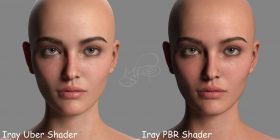
Side by side Victoria 8.1 face comparison of Daz Studio's PBR Iray Skin Shader and the Iray Uber Shader..

Have you ever been frustrated with skin that looks flat in Daz Studio? Dull and lifeless? Rubbery with a distinct likeness to that of Gumby? Or maybe it just needs a little bit of pop? Most of the time, any of these issues can be attributed to SSS, or subsurface scattering, and there are a couple easy tweaks that can be made to drastically improve the look of skin in Daz.

Filed Under: Daz Studio, Iray Tagged With: 3d-skin, advanced skin, advanced skin settings, computer skin, daz, daz iray, daz studio, daz studio iray, daz studio skin, ds skin, human skin, iray human skin, iray skin, iray skin shader, iray skin tutorial, realistic 3d-skin, realistic computer skin, realistic skin, skin, skin material, skin shader, skin shader tutorial, skin tutorial

How to Transform Your 3D Art into a Charcoal Sketch
February 19, 2017 by Guest Writer 1 Comment

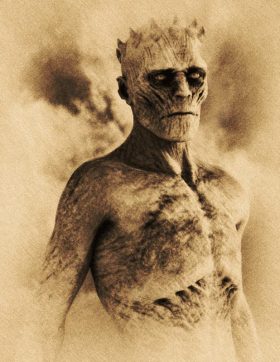
Daz Studio render of a White Walker after it has been converted into a charcoal sketch using Google's Nik Collection toolset.

In this tutorial we use the Nik Collection and Photoshop to turn a 3d-art render into a fine art charcoal study. The process is simple, fun, and a great introduction to the Nik tools, which you can get for free from Google.

Filed Under: 2D Art, Daz Studio, Postwork Tagged With: 3d-art, 3d-art-tutorial, charcoal, daz studio post-work, daz studio postwork, nik, nik collection, nik tools, Photoshop, photoshop nik, photoshop tutorial, post-work, post-work tutorial, postwork, postwork tutorial

Deviant Art Q&A with Becarra

September 19, 2016 by Guest Writer 4 Comments

Based on a mixture of the iconic Assassin's Creed Mythology and the popular bounty hunters of Star Wars*, the character of Mando Creed is a formidable warrior who will follow the Order's mandate to ensure galactic peace.

Becarra, a popular 3d-artist on Deviant Art, weigh in on getting views, followers, and more.

Filed Under: 2D Art, 3D Art Tagged With: 3d-art, art, art promotion, da, deviantart, followers, make money, make money art, promote art, q&a, question answer, viewers, watchers

Daz Studio Octane Postwork Tutorial

August 18, 2016 by Guest Writer 1 Comment

Comparison of our postworked image with the original render. The left half of our woman's face shows the original render and the right half shows our postworked version.

How to make Daz Studio Octane skin look even better through postwork techniques in Photoshop. This tutorial is for beginners.

Filed Under: Daz Studio, Octane Tagged With: daz studio, daz studio octane, daz studio octane tutorial, daz studio postwork, daz studio tutorial, octane, Photoshop, postwork, postwork tutorial

Advanced Skin Material Settings for Daz Studio Octane
June 14, 2016 by Guest Writer Leave a Comment

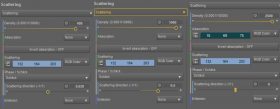
Diagram showing the Daz Studio Octane scattering node settings for three different skin layers.

We discuss more advanced settings for skin materials in Daz Studio Octane. This includes sub-surface scattering (SSS) settings, glossiness, auto-material, and more.

Filed Under: Daz Studio Tagged With: advanced skin, advanced skin settings, daz studio, daz studio octane, daz studio octane tutorial, daz studio tutorial, octane, octane material, octane skin, octane skin material, skin, skin material, sss, sub-surface scattering

How to Set-Up Camera, Lights, & Displacement in Daz Studio Octane
May 25, 2016 by Guest Writer 4 Comments

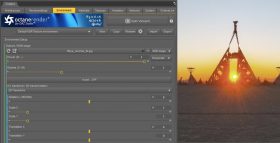
Screenshot of the Environment Map interface in Daz Studio Octane.

Beginner’s tutorial on how to set up simple lights, camera, and displacement maps in Daz Studio Octane.

Filed Under: Daz Studio Tagged With: camera, daz studio, daz studio octane, daz studio octane tutorial, daz studio tutorial, displacement map, light, octane, octane camera, octane displacement, octane hdri, octane lights, octane renderer, octane shader, tutorial

How to Create Realistic Skin in Daz Studio Octane
May 8, 2016 by Guest Writer 4 Comments

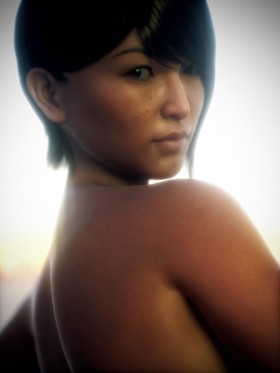
Asian woman portrait with realistic Octane skin shader. Rendered in Daz Studio Octane.

One big challenge in 3d-art is to capture the complexity of human skin and make it look more organic and less synthetic. Here, we take a deep look on how to set-up realistic looking human skin in Daz Studio Octane.

Filed Under: Daz Studio Tagged With: daz studio, daz studio octane, daz studio octane tutorial, daz studio tutorial, octane, octane material, octane renderer, octane shader, octane skin, octane skin material, skin material, skin shader, tutorial

An Introduction to Daz Studio Octane

April 26, 2016 by Guest Writer 3 Comments

Fantasy art of a woman head to head and growling at a tiger.

The Octane renderer is fast and can produce great looking renders. Here, we give an overview of using Octane from within Daz Studio, along with the tools and settings you will need.

Filed Under: Daz Studio Tagged With: daz studio, daz studio octane, daz studio octane tutorial, daz studio tutorial, octane, octane renderer, tutorial

Recent Posts

  • Duality of life and death represented by a day of the dead girl with black flowers and butterflies on her headdress surrounded by skeletons. Gothic fantasy woman art. Daz Studio Iray image.What Does Our Art Say About Us?
  • Side by side face comparisons of out-of-the-box Millawa 8 face and skin and multiple tweaked Millawa 8 face and skin.Making Skin Pop with the Daz Studio Iray Uber Shader - Part 2
  • Side by side Victoria 8.1 face comparison of Daz Studio's PBR Iray Skin Shader and the Iray Uber Shader..Making Skin Pop with the Daz Studio Iray Uber Shader - Part 1
  • Item used: VR X01 BYOS Modular by Studio360.3D-Art Contest Winners ~ April 2020
  • Qualifying item used Inside Linday's Daz Studio Iray Scenes by Linday3D-Art Contest Winners ~ March 2020
  • Qualifying item used –Z Beauty Poses for Kalea 73D-Art Contest Winners ~ February 2020
  • Qualifying item: - Li'l Scrap Boy HD for Genesis 8 Male by Pixeluna3D-Art Contest Winners ~ January 2020
  • Qualifying items used –Ancient Tomes by Merlin Studios3D-Art Contest Winners ~ December 2019
  • Shiba contest qualifying Item used: Mech Dancer Outfit3D-Art Contest Winners ~ November 2019
  • Shiba contest qualifying items used – Greeble City Blocks, Greeble City Blocks 2, Greeble City Blocks 3; and Greeble City Blocks 04 by Stonemason.3D-Art Contest Winners ~ October 2019

Recent Comments

  • Catwoman sitting on a papasan chair with several cats around her. Moon in the background.How to Save a Single Frame in Daz Studio
    • DV FiSTer
      - 10 years after you posted this, but THANK YOU!!!I don't get why they don't give a simple - save this ...
    • Dan
      - Thank you! This was very helpful
    • rto3d
      - outstanding solution !! thank you so much :-)
  • Side by side face comparisons of out-of-the-box Millawa 8 face and skin and multiple tweaked Millawa 8 face and skin.Making Skin Pop with the Daz Studio Iray Uber Shader – Part 2
    • Andew
      - Thanks, not originally what it was intended for but the advice in these 2 tutorials has also helped me ...
    • Nix
      - Thanks so much for this. Very helpful!
    • MILT51
      - Wow!!! You are truly a very talented (gifted) artist. I love these tutorials #1 & #2, I never thought ...
    • Adil
      - Hi,I hope everything is good at your end. Please if you can help me with light scene duf file for ...
  • Girl with pink hair, pink dress, and pink petals blowing in the wind. Daz Studio dForce Iray picture. Fantasy Art.How to Save a Daz Studio dForce Frame as a Morph
    • Hal
      - Thank you for the great tutorial! I wonder about a variant. I am trying to create a looping animation. ...
  • Warrior woman riding on a tiger while shooting a bow and arrow.How to Combine Multiple Poses in Daz Studio
    • David
      - Very good and important tutorial. This has been up for years and i still keep coming back to it
  • Girl in white dress looking sad because she has to say goodbye to a good friend.Poser, Daz Studio, Carrara – Which One Should I Use?
    • how me
      - This is well out of date

Copyright © 2026 · Genesis Skins by ShibaShake · Terms of Service · Privacy Policy ·