Think, Draw, Art!

for art lovers

  • Home
  • Gallery
  • Contact
  • Recent Articles
  • Article Categories
    • Daz Studio
    • 3D Art
    • 2D Art
    • Contest

Pre and Post-Work Images – Cute Cat Girls, Fantasy Women Pin-Up Art

July 17, 2018 by shibashake 3 Comments

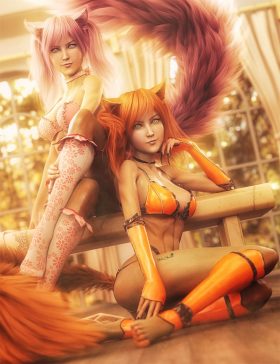
Two cute cat girls, one sitting on the floor with red hair and another sitting on a bench with pink hair. Fantasy women pin-up art. Daz Studio Iray image.

Before and after image progression of my Cute Cat Girls Fantasy Pin-Up Art.

Filed Under: Daz Studio, Iray, Postwork Tagged With: 3d art, 3d images, 3d-art, daz studio, daz studio iray, daz studio iray post-work, daz studio post-work, image, images, iray, iray post-work, irayrenders, Photoshop, post-work, postwork

Cyborg Girl Fantasy Art and Blending Effects in Photoshop

March 28, 2018 by shibashake Leave a Comment

Final cyborg girl fantasy image when blending mode is set to Lighter Color.

In this cyborg girl fantasy art tutorial, I use Photoshop blending mode to get different color effects in my image. Original scene created in Daz Studio and rendered in Daz Studio Iray.

Filed Under: Daz Studio, Iray, Postwork Tagged With: adjustment layer, blending, blending mode, color, cyborg, cyborg girl, daz studio, daz studio iray, daz studio iray post-work, daz studio post-work, fantasy, fantasy art, fantasy sci-fi, iray post-work, Photoshop, photoshop blending, photoshop tutorial, post-work, post-work tutorial, remove color, saturation, sci-fi, sci-fi art, unsaturated

Pre and Post-Work Images – Redhead Warrior Woman Fantasy Art

July 20, 2017 by shibashake 4 Comments

Red head warrior woman with armor and sword looking over her shoulder. Gate and skull mountain in the backdrop.

Before and after image progression of my Redhead Warrior Woman Fantasy Art.

Filed Under: Daz Studio, Iray, Postwork Tagged With: 3d art, 3d images, 3d-art, daz studio, daz studio iray, daz studio iray post-work, daz studio post-work, image, images, iray, iray post-work, irayrenders, Photoshop, post-work, postwork

Step-by-Step Daz Studio Post-Work Tutorial
December 18, 2016 by shibashake 19 Comments

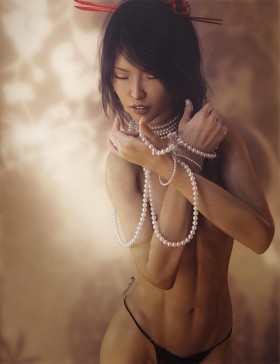
Daz Studio Iray Asian woman pin-up with her eyes closed and holding strands of pearls.

A step-by-step postwork tutorial on my Asian Girl with Pearls image. Scene was created in Daz Studio and initial light layers were rendered in Daz Studio Iray.

Filed Under: 2D Art, Daz Studio, Iray Tagged With: 3d-art, 3d-art-tutorial, daz studio iray post-work, daz studio iray tutorial, daz studio post-work, daz studio tutorial, iray post-work, Photoshop, photoshop tutorial, post-work, post-work tutorial, postwork

Recent Posts

  • Duality of life and death represented by a day of the dead girl with black flowers and butterflies on her headdress surrounded by skeletons. Gothic fantasy woman art. Daz Studio Iray image.What Does Our Art Say About Us?
  • Side by side face comparisons of out-of-the-box Millawa 8 face and skin and multiple tweaked Millawa 8 face and skin.Making Skin Pop with the Daz Studio Iray Uber Shader - Part 2
  • Side by side Victoria 8.1 face comparison of Daz Studio's PBR Iray Skin Shader and the Iray Uber Shader..Making Skin Pop with the Daz Studio Iray Uber Shader - Part 1
  • Item used: VR X01 BYOS Modular by Studio360.3D-Art Contest Winners ~ April 2020
  • Qualifying item used Inside Linday's Daz Studio Iray Scenes by Linday3D-Art Contest Winners ~ March 2020
  • Qualifying item used –Z Beauty Poses for Kalea 73D-Art Contest Winners ~ February 2020
  • Qualifying item: - Li'l Scrap Boy HD for Genesis 8 Male by Pixeluna3D-Art Contest Winners ~ January 2020
  • Qualifying items used –Ancient Tomes by Merlin Studios3D-Art Contest Winners ~ December 2019
  • Shiba contest qualifying Item used: Mech Dancer Outfit3D-Art Contest Winners ~ November 2019
  • Shiba contest qualifying items used – Greeble City Blocks, Greeble City Blocks 2, Greeble City Blocks 3; and Greeble City Blocks 04 by Stonemason.3D-Art Contest Winners ~ October 2019

Recent Comments

  • Catwoman sitting on a papasan chair with several cats around her. Moon in the background.How to Save a Single Frame in Daz Studio
    • DV FiSTer
      - 10 years after you posted this, but THANK YOU!!!I don't get why they don't give a simple - save this ...
    • Dan
      - Thank you! This was very helpful
    • rto3d
      - outstanding solution !! thank you so much :-)
  • Side by side face comparisons of out-of-the-box Millawa 8 face and skin and multiple tweaked Millawa 8 face and skin.Making Skin Pop with the Daz Studio Iray Uber Shader – Part 2
    • Andew
      - Thanks, not originally what it was intended for but the advice in these 2 tutorials has also helped me ...
    • Nix
      - Thanks so much for this. Very helpful!
    • MILT51
      - Wow!!! You are truly a very talented (gifted) artist. I love these tutorials #1 & #2, I never thought ...
    • Adil
      - Hi,I hope everything is good at your end. Please if you can help me with light scene duf file for ...
  • Girl with pink hair, pink dress, and pink petals blowing in the wind. Daz Studio dForce Iray picture. Fantasy Art.How to Save a Daz Studio dForce Frame as a Morph
    • Hal
      - Thank you for the great tutorial! I wonder about a variant. I am trying to create a looping animation. ...
  • Warrior woman riding on a tiger while shooting a bow and arrow.How to Combine Multiple Poses in Daz Studio
    • David
      - Very good and important tutorial. This has been up for years and i still keep coming back to it
  • Girl in white dress looking sad because she has to say goodbye to a good friend.Poser, Daz Studio, Carrara – Which One Should I Use?
    • how me
      - This is well out of date

Copyright © 2026 · Genesis Skins by ShibaShake · Terms of Service · Privacy Policy ·